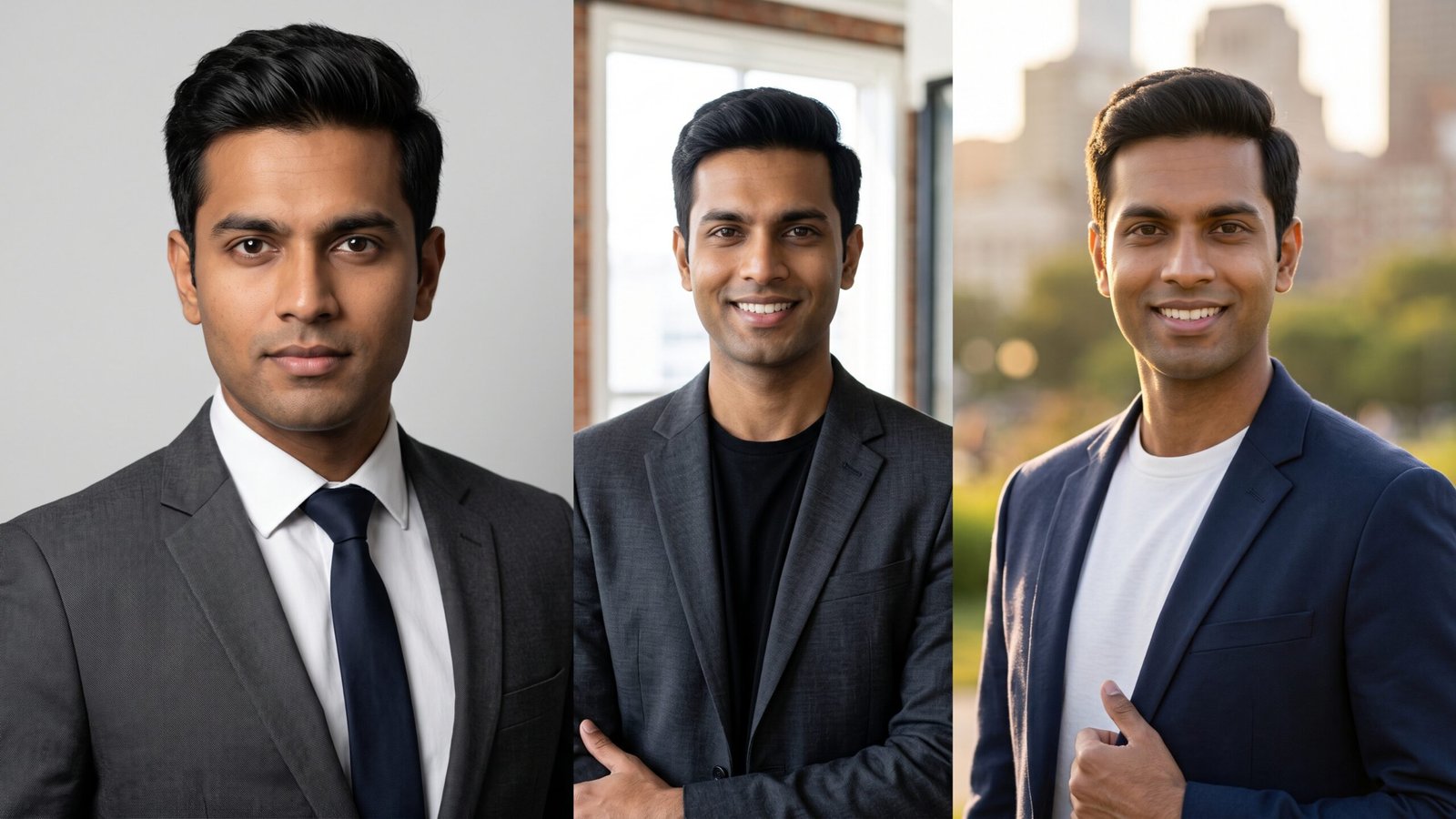
If you want a polished, studio-quality LinkedIn headshot without booking a photographer, Gemini AI can turn a regular selfie into a professional profile photo using the right prompts. In this guide, I’m sharing 10 tested Gemini AI prompts built specifically for men who want to look sharp, credible, and approachable on LinkedIn.
Your profile photo is often the first impression a recruiter, client, or connection has of you, and on LinkedIn that impression forms in seconds. I’ve spent a lot of time testing prompts across different outfits, lighting setups, and backgrounds to figure out what actually reads as “professional” versus what looks obviously AI-generated. Below, you’ll find 10 prompts covering everything from classic corporate suits to smart-casual startup looks, plus tips on getting the most realistic, face-accurate results.
Here’s a quick look at what each prompt creates before we get into the full details.
| Prompt Name | What It Creates | Use Case |
|---|---|---|
| Classic Corporate Suit Headshot | Dark suit, studio background, formal pose | Corporate roles, finance, law, consulting |
| Smart Casual Office Portrait | Blazer with no tie, softer lighting | Tech, marketing, general business roles |
| Executive Grey Background Portrait | Neutral grey backdrop, confident stance | Senior leadership, management profiles |
| Startup Founder Headshot | Casual blazer, open office setting | Founders, entrepreneurs, startup teams |
| Outdoor Natural Light Headshot | Daylight, blurred outdoor backdrop | Freelancers, consultants, creative professionals |
| Navy Blazer Studio Headshot | Navy blazer, white shirt, soft studio light | Sales, business development, client-facing roles |
| Warm Approachable Bio Photo | Gentle smile, warm-toned lighting | Company “About Us” pages, team bios |
| Black and White Editorial Headshot | Monochrome, dramatic lighting | Personal branding, thought leadership |
| Glasses and Blazer Professional Look | Glasses, textured blazer, clean backdrop | Tech, academia, consulting |
| Confident Arms-Crossed Portrait | Arms crossed, bold stance, blurred office | Executives, managers, leadership pages |
Why Gemini AI Works Well for LinkedIn Headshots
Before jumping into the prompts, it helps to understand why this approach works. Gemini AI (including the Nano Banana models) can take an uploaded reference photo and regenerate it with a new outfit, background, and lighting setup while keeping your actual face intact. That’s the key difference between this and generic AI headshot generators — you’re not getting a stranger’s face with your name attached, you’re getting your own face in a more polished setting.
A few things make the results look convincing rather than obviously synthetic:
- Clear, well-lit reference photos produce far more accurate results than blurry or dimly lit selfies.
- Specific outfit and lighting instructions stop Gemini from defaulting to generic or mismatched clothing.
- Face-preservation language in the prompt keeps your features, skin tone, and expression consistent with your original photo.
- Realistic background choices (studio, office, outdoor) matter more than people expect — an overly staged background is often what gives away an AI photo.
With that in mind, here are the 10 prompts.
Prompt #1: Classic Corporate Suit Headshot
Concept: A traditional, no-nonsense LinkedIn headshot that works for finance, law, consulting, and other formal industries.

Prompt: Generate a hyper-realistic professional LinkedIn headshot of the man in the uploaded reference photo. Outfit: charcoal grey slim-fit suit jacket, crisp white dress shirt, dark navy tie, top button fastened. Background: plain light grey studio backdrop with soft, even lighting and subtle shadow falloff. Pose: shoulders slightly angled toward the camera, chin level, direct eye contact, confident neutral expression. Lighting: soft studio key light with gentle fill light to avoid harsh shadows on the face. Camera: shot on an 85mm portrait lens, shallow depth of field, sharp focus on the eyes. The person’s facial features, skin tone, hairstyle, and expression must remain 100% consistent with the uploaded reference photo — do not alter the face in any way.
Best for: Corporate, finance, legal, and consulting professionals who need a formal, traditional headshot.
Pro Tip: If your industry leans conservative, stick with a solid tie rather than a patterned one — it reads as more polished in a small profile-photo frame.
Explore More: 8 Regal Sherwani Look Gemini AI Prompts for Grooms
Prompt #2: Smart Casual Office Portrait
Concept: A relaxed but still professional look, ideal for tech, marketing, and modern business environments where a full suit feels too formal.

Prompt: Create a photorealistic LinkedIn headshot of the man from the uploaded photo. Outfit: heather-grey blazer over a light blue button-down shirt, no tie, top button open. Background: blurred modern office interior with soft daylight and a hint of greenery in the far background. Pose: relaxed but upright posture, natural half-smile, shoulders facing slightly off-center from the camera. Lighting: soft natural window light from one side, balanced with gentle fill to keep the face evenly lit. Camera: portrait mode with shallow depth of field so the background stays softly blurred while the face stays sharp. Keep the person’s face, features, and skin tone exactly identical to the reference photo, with no alterations to identity.
Best for: Tech professionals, marketers, and anyone in a business-casual workplace culture.
Pro Tip: A genuine half-smile tends to perform better than a full grin or a completely flat expression — it reads as approachable without looking posed.
Explore More: 10 Old Money Aesthetic Gemini AI Prompts for Men’s Portraits
Prompt #3: Executive Grey Background Portrait
Concept: A clean, minimal headshot with a solid neutral background — the safest, most versatile option for senior leadership profiles.

Prompt: Generate a professional executive headshot of the man in the uploaded reference image. Outfit: dark navy suit jacket with a white dress shirt, no tie, top button open. Background: seamless neutral grey studio backdrop with no texture or distractions. Pose: squared shoulders, arms relaxed at the sides, direct confident gaze into the camera. Lighting: classic three-point studio lighting setup — key light, fill light, and a subtle rim light to separate the subject from the background. Camera: sharp focus on the eyes and face, slightly soft background falloff. The subject’s face must remain fully consistent with the uploaded photo — same facial structure, skin tone, and expression, with zero identity changes.
Best for: Senior managers, directors, and executives who want a timeless, boardroom-ready photo.
Pro Tip: Grey backgrounds tend to look more natural than pure white ones, which can sometimes appear washed out or overexposed on smaller screens.
Explore More: 10 1920s Vintage Gangster Look Gemini AI Prompts for Men
Prompt #4: Startup Founder Headshot
Concept: A confident but unpretentious look for founders and entrepreneurs, shot in a real working environment rather than a studio.

Prompt: Create a realistic LinkedIn-style headshot of the man in the uploaded photo. Outfit: fitted charcoal blazer over a plain black or dark grey crew-neck t-shirt. Background: modern open-plan startup office with exposed brick or glass partitions, softly blurred in the background. Pose: arms loosely crossed or one hand in pocket, relaxed confident stance, genuine slight smile. Lighting: bright, natural daylight streaming in from large windows, soft and even across the face. Camera: shot with a shallow depth of field so the office details blur gently behind the subject. Preserve the person’s exact facial features, skin tone, and expression from the reference photo without any changes to identity.
Best for: Startup founders, entrepreneurs, and product leads who want to look driven but approachable.
Pro Tip: Skip the tie and full suit here — founder profiles that look too corporate can actually come across as less credible in startup circles.
Explore More: 10 Miniature Diorama Gemini AI Prompts for Men’s Desk Displays
Prompt #5: Outdoor Natural Light Headshot
Concept: A softer, more human-feeling headshot for freelancers, consultants, and creatives who don’t want a stiff studio look.

Prompt: Generate a photorealistic outdoor professional headshot of the man in the uploaded reference photo. Outfit: navy or olive smart-casual blazer over a plain white or light-colored shirt. Background: softly blurred outdoor setting — a city street, park, or building exterior with warm natural tones. Pose: relaxed three-quarter turn toward the camera, natural smile, hands either at the sides or one resting near a lapel. Lighting: golden-hour natural sunlight, soft and warm, avoiding harsh shadows on the face. Camera: shallow depth of field with the background gently out of focus, sharp detail retained on the face and eyes. The person’s facial identity, skin tone, and expression must exactly match the uploaded reference photo.
Best for: Freelancers, consultants, and independent professionals who want a warmer, less corporate feel.
Pro Tip: Golden-hour lighting is forgiving on skin tones and works well if your reference photo was taken indoors under flat lighting.
Explore More: 8 Instagram-Viral 1/7 Scale Action Figure Gemini AI Prompts for Men
Prompt #6: Navy Blazer Studio Headshot
Concept: A versatile, client-facing headshot that balances formality with warmth — a strong default choice for most industries.

Prompt: Create a hyper-realistic LinkedIn headshot of the man from the uploaded photo. Outfit: tailored navy blazer, crisp white dress shirt, no tie, top button open. Background: soft light-grey or beige studio backdrop with subtle gradient lighting. Pose: shoulders angled slightly, chin level, warm confident expression with direct eye contact. Lighting: soft diffused studio lighting with a gentle catchlight in the eyes. Camera: 85mm-equivalent portrait lens look, sharp focus on the face with a smooth, softly blurred background. Keep the subject’s face, skin tone, and features identical to the reference photo with no identity changes whatsoever.
Best for: Sales, business development, and client-facing roles where approachability matters as much as authority.
Pro Tip: Navy tends to photograph better than black under studio lighting — it looks less flat and photographs with more visible texture.
Explore More: 8 Best Friends Group Gemini AI Prompts for Instagram Reels
Prompt #7: Warm Approachable Bio Photo
Concept: A friendlier, warmer-toned headshot suited for team pages, “About Us” sections, or a secondary LinkedIn photo that shows personality.

Prompt: Generate a warm, approachable professional headshot of the man in the uploaded reference photo. Outfit: soft heather or light blue sweater over a collared shirt, no jacket. Background: warm-toned blurred office or indoor setting with soft ambient light. Pose: relaxed posture, genuine warm smile, head slightly tilted for a friendlier feel. Lighting: warm, soft lighting from the front and side, avoiding cold or clinical tones. Camera: shallow depth of field, natural skin texture retained, no over-smoothing. Ensure the person’s facial structure, skin tone, and expression are fully consistent with the reference photo, with the face left completely unaltered.
Best for: Company bio pages, team directories, and professionals in people-facing or client-relations roles.
Pro Tip: This style works well as a second photo alongside a more formal headshot — some platforms and bio pages benefit from a slightly softer tone than LinkedIn’s main profile photo.
Explore More: 9 Father Son Bonding Gemini AI Prompts for Cinematic Photos
Prompt #8: Black and White Editorial Headshot
Concept: A striking monochrome portrait for men who want their LinkedIn photo to double as a personal branding image on other platforms too.
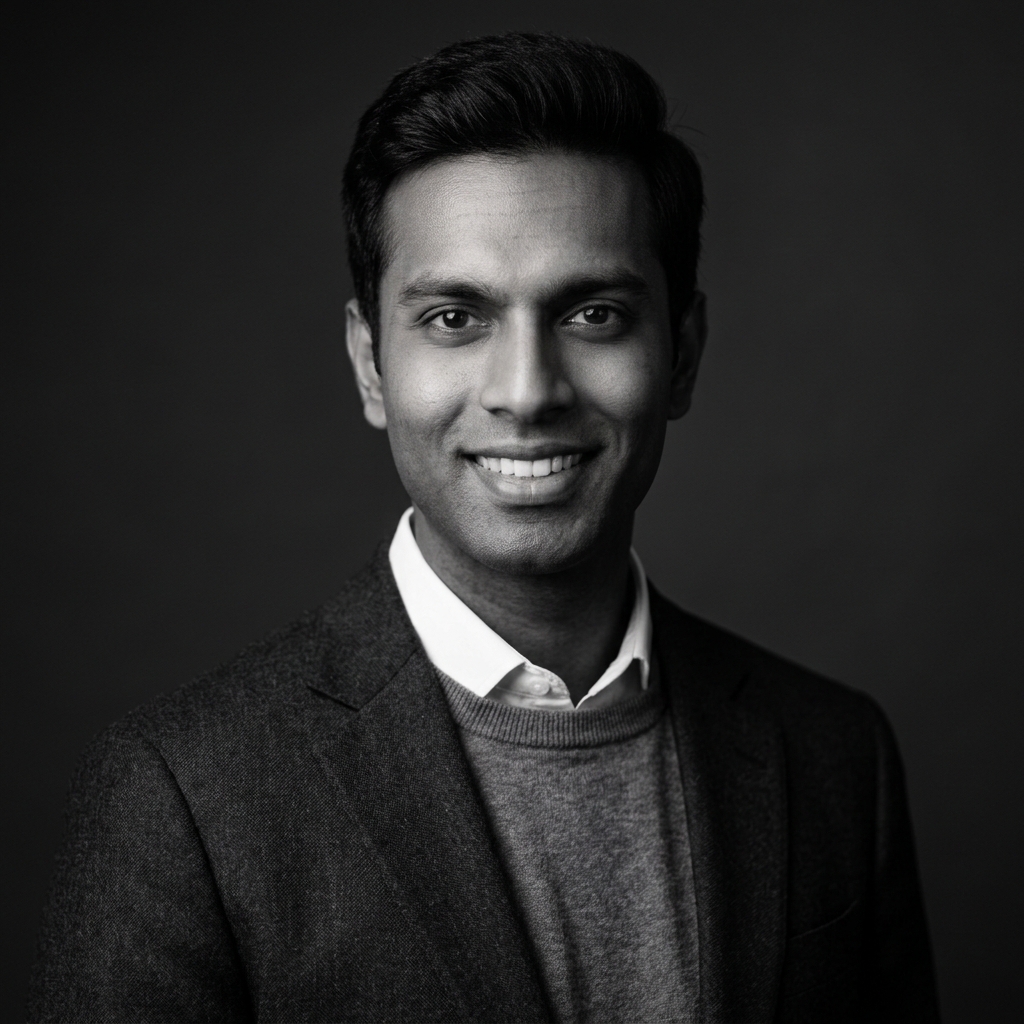
Prompt: Create a professional black-and-white editorial headshot of the man in the uploaded photo. Outfit: dark suit jacket or turtleneck, minimal and clean styling. Background: plain dark or neutral studio backdrop with dramatic falloff. Pose: strong, confident stance, direct gaze into the camera, serious but composed expression. Lighting: dramatic single-source studio lighting with defined shadows and strong contrast, converted to black and white. Camera: sharp focus on the eyes, fine detail retained in skin texture, cinematic tonal range. The subject’s facial features and expression must remain exactly consistent with the uploaded reference photo — only the color treatment should change, not the identity.
Best for: Thought leaders, consultants, and anyone building a personal brand across multiple platforms.
Pro Tip: Black and white photos stand out in a LinkedIn feed full of color headshots, but they work best as a secondary or personal-brand image rather than your only profile photo.
Explore More: Film Noir Black and White Gemini AI Prompts for Men
Prompt #9: Glasses and Blazer Professional Look
Concept: A sharp, intellectual look for men who wear glasses and want a headshot that reflects their everyday appearance accurately.

Prompt: Generate a realistic professional LinkedIn headshot of the man in the uploaded reference photo, keeping his glasses intact and clearly visible. Outfit: textured grey or navy blazer over a plain collared shirt. Background: soft neutral studio background with gentle gradient lighting. Pose: upright confident posture, slight forward lean, warm but composed expression. Lighting: soft studio lighting positioned to avoid glare or reflections on the glasses lenses. Camera: sharp focus on the eyes behind the glasses, natural skin tones, shallow background blur. The person’s face, glasses, hairstyle, and expression must remain fully consistent with the reference photo, with no changes to identity.
Best for: Professionals in tech, academia, and consulting who want their headshot to look exactly like their day-to-day appearance.
Pro Tip: Explicitly mentioning “avoid glare or reflections on the lenses” makes a real difference — this is one of the most common issues with AI-generated photos of people who wear glasses.
Explore More: 8 Brother Duo Instagram Trending Google Gemini AI Prompts
Prompt #10: Confident Arms-Crossed Portrait
Concept: A bold, authoritative headshot for managers and executives who want their photo to project leadership at a glance.

Prompt: Create a hyper-realistic professional headshot of the man in the uploaded photo in a confident arms-crossed pose. Outfit: dark suit jacket, no tie, top button open, sleeves properly tailored. Background: blurred modern office or boardroom setting with soft ambient light. Pose: arms confidently crossed, shoulders squared to the camera, strong composed expression with direct eye contact. Lighting: soft studio-style lighting with subtle shadow definition to add depth. Camera: shallow depth of field, sharp focus on the face and upper body, background softly blurred. Keep the subject’s facial features, skin tone, and expression exactly identical to the uploaded reference photo, with the identity fully preserved.
Best for: Managers, executives, and leadership team pages where projecting authority is the priority.
Pro Tip: An arms-crossed pose can look stiff if the shoulders are tense — ask for “relaxed shoulders” in the prompt if your first result looks too rigid.
Explore More: 9 Royal Palace Background Gemini AI Prompts for Saree Photoshoot
Tips for Getting the Most Realistic Results
A good prompt only gets you halfway there. The quality of your reference photo and a few small adjustments can make the difference between a headshot that looks convincingly real and one that looks obviously generated.
- Start with a clear, front-facing reference photo taken in good lighting — avoid heavily filtered or low-resolution selfies.
- Upload more than one reference angle if the tool allows it, since this helps Gemini preserve facial accuracy more consistently.
- Always include face-preservation language in your prompt, so the AI doesn’t quietly alter your jawline, skin tone, or features.
- Generate a few variations of the same prompt before picking a final image — small differences in expression or lighting can matter a lot.
- Check hands and collar details closely, since these are the areas AI tools most often get slightly wrong.
Final Thoughts
A strong LinkedIn headshot doesn’t require a photography budget anymore — the right Gemini AI prompt, paired with a clear reference photo, can get you a professional, recruiter-ready image in minutes. Start with the corporate suit or navy blazer prompt if you want a safe, versatile option, and experiment with the outdoor or black-and-white styles once you’re comfortable with how Gemini handles your face.
Which prompt matches the impression you want your LinkedIn profile to make? Try one this week, and if you want to explore more styles beyond the professional look, check out the related prompt collections linked throughout this guide.
Frequently Asked Questions
Is it okay to use an AI-generated headshot on LinkedIn?
Yes, as long as the photo still looks like you. LinkedIn doesn’t prohibit AI-enhanced photos, but the goal should be a polished version of your real appearance, not a different-looking person — recruiters and connections should still recognize you in person.
Which Gemini model works best for these prompts?
The Nano Banana and Nano Banana Pro models within Gemini are currently the most commonly used for photorealistic headshot editing, since they handle face preservation and lighting more consistently than earlier versions.
How do I stop Gemini from changing my face too much?
Always include explicit face-preservation instructions in your prompt, such as asking it to keep facial features, skin tone, and expression identical to the reference photo. Using a clear, well-lit, front-facing reference image also significantly improves accuracy.
Can I use these prompts with ChatGPT instead of Gemini?
Most of these prompts work reasonably well with ChatGPT’s image tools too, though results can vary slightly in how accurately they preserve facial details. Gemini’s Nano Banana models are generally considered stronger for this specific type of face-consistent editing.
4 thoughts on “10 LinkedIn Headshot Gemini AI Prompts for Professional Men”